
Phishing Alert - Beware of Fraudulent “WhatsApp Security Centre” Pages Hijacking Accounts
Type: Phishing
Phishing Alert
Current Status and Related Trends
The public is advised to stay vigilant against phishing campaigns targeting WhatsApp users. In this scam, attackers impersonate “WhatsApp Security Centre” and falsely claim that the victim’s account has been locked due to a “security risk”. Victims are then lured to a phishing website and deceived into linking their WhatsApp account to an attacker-controlled device through WhatsApp’s legitimate Linked devices feature.
After completing the fraudulent “verification” process, the attacker may gain unauthorised access to the victim’s WhatsApp account and use it for further malicious activities, including impersonation and scams targeting the victim’s contacts.
Phishing Campaign Tactics
The phishing campaign typically proceeds as follows:
The attacker sends a message claiming that the recipient’s WhatsApp account has been locked due to a “security risk” and can no longer send messages.
The message contains a phishing URL, claiming that the account can be “unlocked” by visiting the link.
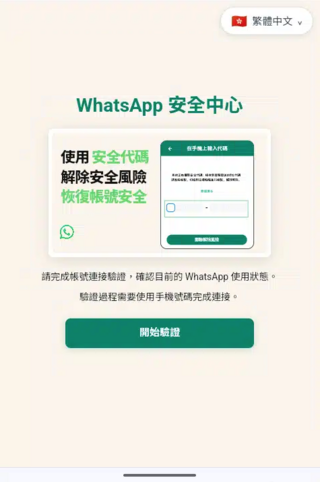
Upon visiting the phishing website, the victim is presented with a page masquerading as “WhatsApp Security Centre” and is prompted to click a “Start Verify” button.
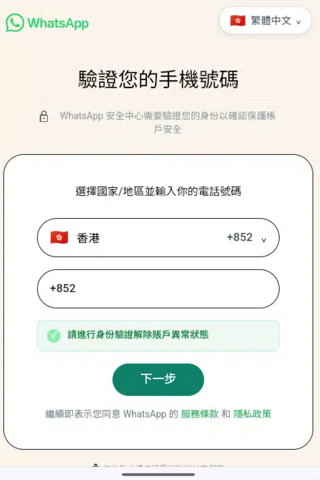
The phishing website then requests the victim to enter the phone number associated with the WhatsApp account.
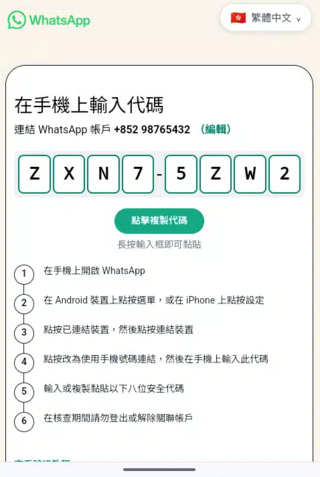
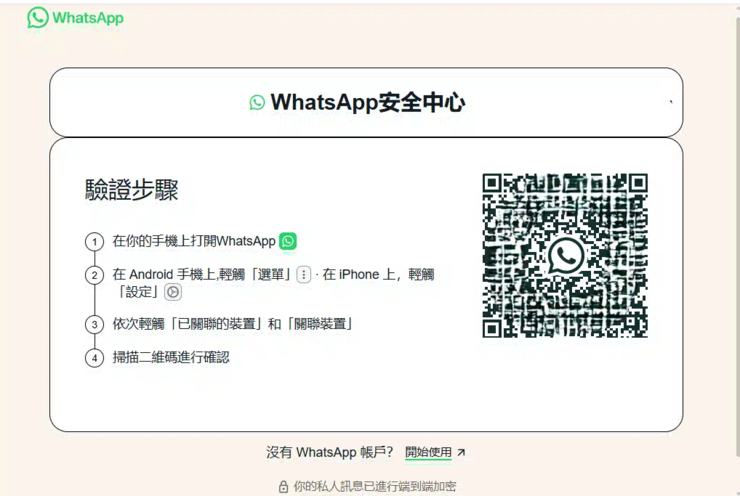
The victim is subsequently instructed to complete the so-called verification process within the WhatsApp application via Settings → Linked devices. Depending on the phishing variant, the victim may be asked either:
- to scan a QR code displayed on the phishing website; or
- to select Link with phone number and enter an 8-character alphanumeric code shown on the phishing page as an alleged authentication code.
Once the victim scans the QR code or enters the code as instructed, the attacker links the victim’s WhatsApp account to an attacker-controlled device and gains unauthorised access.
Screen Captures of Phishing Websites
Screen captures of the phishing websites involved in this campaign will be provided in this section for reference.
Possible Risks
If the phishing attempt is successful, the following risks may arise:
- Unauthorised access to the victim’s WhatsApp account
- Impersonation of the victim
- Fraudulent messages sent to the victim’s contacts
- Social engineering and scam attempts targeting friends, family members, or business contacts
- Exposure of chat history, contact information, or other sensitive information accessible through the account
Security Recommendations
The public is advised to take the following precautions:
- Do not trust messages claiming that your WhatsApp account has been locked and asking you to click on a link for verification or recovery
- Do not scan unknown QR codes or enter codes provided by websites into WhatsApp’s Linked devices function
- Do not follow unsolicited instructions to use Link with phone number in WhatsApp
- Verify account-related alerts only through official WhatsApp channels
- Regularly review the devices linked to your WhatsApp account and remove any unrecognised devices immediately
- Enable two-step verification in WhatsApp to strengthen account security
- Remain cautious of messages creating a false sense of urgency, such as claims involving account suspension or security issues
- When receiving unusual requests from friends or family through instant messaging applications, such as requests to borrow money, provide verification codes, or click on links, verify their identity through other means first
- Only download and install instant messaging applications from official app stores, and avoid using modified or untrusted versions
- Keep instant messaging applications and device operating systems up to date, and apply security updates promptly, to reduce the risk of hackers compromising accounts or devices by exploiting known vulnerabilities
If You Suspect Your WhatsApp Account Has Been Compromised
Users who may have followed the phishing instructions should take the following actions immediately:
- Open WhatsApp and review Settings → Linked devices
- Remove any unfamiliar linked devices
- Enable or reset two-step verification
- Inform contacts that the account may have been compromised
- Monitor the account for suspicious activities or messages
- Seek assistance through official WhatsApp support channels where necessary
Businesses or members of the public who wish to report to HKCERT on information security related incidents such as malware, phishing, denial of service attacks, etc. can do so by completing the online form at: https://www.hkcert.org/incident-reporting, or calling the 24-hour hotline at +852 8105 6060. For further enquiries, please contact HKCERT at [email protected].
Related Tags
Share with